Porsche CoAnalyst – Generative UI Agent for Procurement
An AI teammate for buyers and controllers
Vision & Identity
Problem. Buyers sit on decades of procurement data in SAP Datasphere and satellite tools, but getting answers still meant waiting for reports, navigating cryptic SAP transactions, or emailing “the one person who knows the query.” A simple question about supplier performance changes could take days.
Vision. CoAnalyst should feel less like another dashboard and more like a smart colleague in the room:
An “agentic data scientist” that you can chat with about suppliers, prices, risks and volumes and that responds with analysis, visualisations and negotiation hints instead of raw tables.
Internally, we framed it as moving procurement “vom operativen Sachbearbeiter zum strategischen Entscheider” – from pushing reports to using AI as a strategic teammate.
My role. I led the product and technical design: from the first Streamlit prototype and prompt-to-SQL agent pipeline to the FastAPI backend, user research, rollout strategy and feedback-driven roadmap.
Origin Story from Forgotten Wiki to Product
The project didn’t start with a roadmap. It started with a company tour.
As part of a university partnership program, I joined a tour of the company’s facilities. The head of digital innovation in procurement, David Boeheim, presented a range of internal AI tools. In the middle of what I expected to be a “dusty giant” of engineering, I found modern LLM-powered solutions that overlapped with topics I’d worked on in university projects. What impressed me most was that the company built these solutions itself, tailored to its use case and infrastructure.
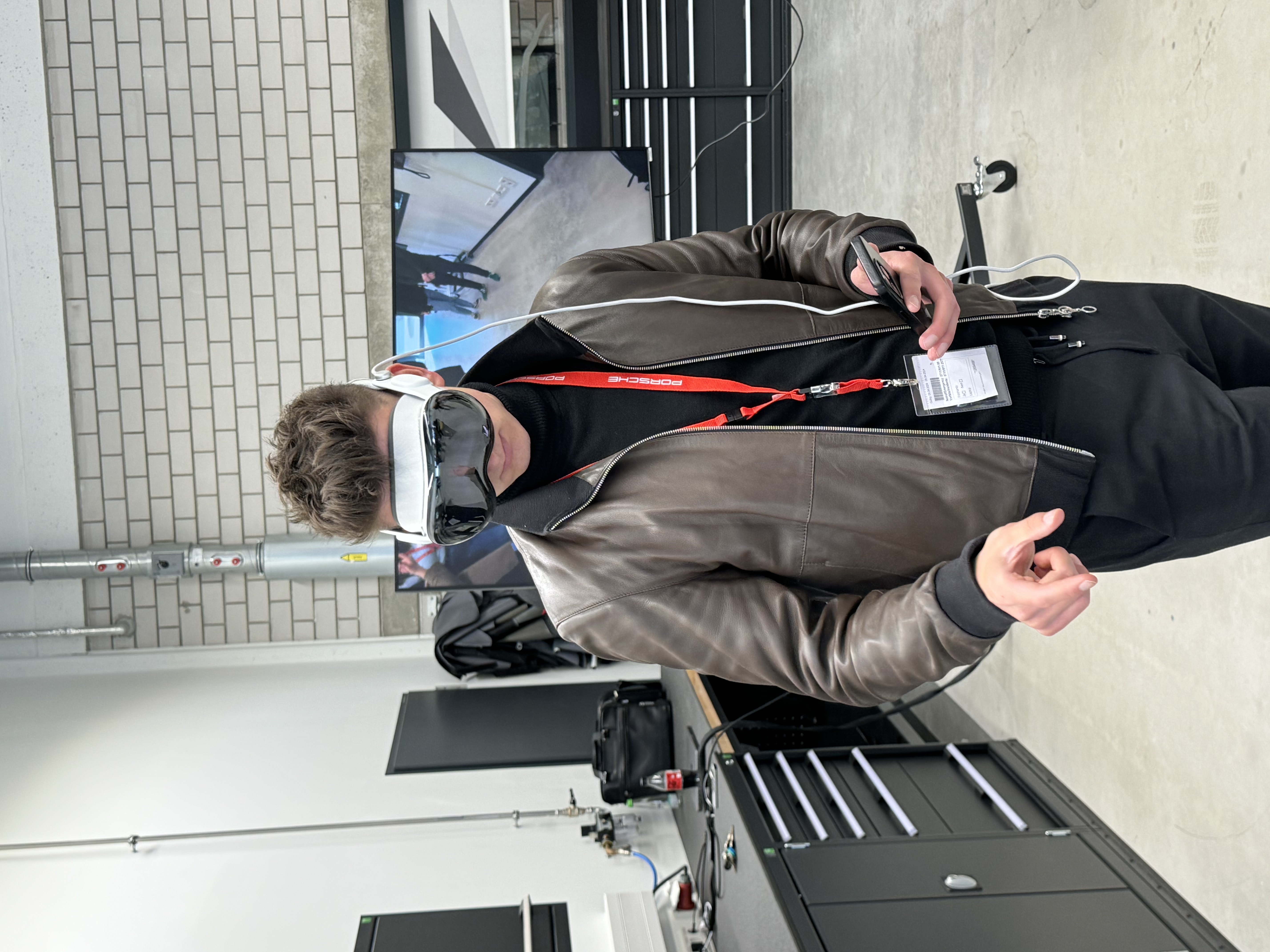
Then came the moment that awakened my inner child. During the tour, we were allowed to view the legendary “Sonderwunsch” models, individually configured vehicles, tailor-made down to the last detail. Suddenly, I was standing there again as a little boy in front of the exact car from my childhood poster. Only this time, it was real.
After the tour, I stayed in touch with David. This led to discussions with various departments where I presented my ideas and background. When I finally applied officially, I received immediate feedback, David was genuinely delighted. Without major negotiations, we agreed on an internship with the prospect of writing my thesis there afterwards.

The First Days: Boredom and Discovery
My first project didn’t go quite as I had expected. My Outlook calendar was filled with appointments titled “Update SAP dashboard” and “Prepare monthly report slides.” During my first few days, I learned about organizational processes, attended meetings on process optimization, and prepared to maintain reports sent to management monthly.
I understood the idea that you have to know how things work before you can change them. Nevertheless, I felt that my energy and technical profile weren’t suited to writing Excel files or polishing PowerPoint slides.
At the same time, I read through an internal wiki. There I came across a project description that seemed almost forgotten: an application that would enable natural language access to SAP data. The last entry was over a year old, and the project had been discontinued after SAP itself announced a similar product called “Joule.” The company stopped its internal project because there was hope that Joule would soon be available as part of the SAP license. But apparently nothing had come of it. No one could tell me when or if Joule would ever be ready for use.
Building the Prototype
I immediately had an idea. In my spare time, I built a simple prototype with Streamlit. The interface was simple: a text input field with a results table below it. A module ran in the background that translated text entries into SQL queries. It wasn’t perfect, but it worked. I integrated live access to a test database and started running through typical use cases.

First test prompt:
Show me all suppliers from [region] with more than 50 orders in the last quarter.
The query ran, the table popped up. It worked.
I showed the prototype to David Boeheim first. He listened calmly to my explanation, clicked around a few times, and finally said:
“Bitte so weitermachen.” (Please continue.)
The following week, I presented the tool to our team during our daily meeting. The interest was high by the time we generated a complex supplier analysis within three seconds.
It was decided to officially resume the project. We named it CoAnalyst.
The goal was to develop a production-ready prototype and get it live as quickly as possible. I completely refactored the code. The SQL generation had to be made more robust, security checks were added, and the connection to SAP databases was reimplemented section by section. At the same time, I clarified with the data protection team whether our architecture met the requirements of the EU AI Act.
Product & Architecture
What CoAnalyst Actually Does
At its core, CoAnalyst lets buyers and controllers:
- Ask questions in natural language (German/English)
- Automatically route those questions to the right data source (risk data, purchasing data, macro data, etc.)
- Generate robust SQL against curated SAP Datasphere views
- Return results as tables, charts and short, negotiation-focused summaries
- Get automatic SQL explanations in business-friendly language
- Receive data analysis and pattern recognition insights
Typical tasks:
- “How have performance values changed for material group X from 2023 to 2024?”
- “Show me the top 10 suppliers by risk in segment Y.”
- “What are the main drivers of performance changes for supplier X?”
- “Current commodity price for aluminum”
- “Financial rating for supplier X”
Architecture in One View
Technically, the system evolved into a modular architecture:
- FastAPI backend hosting the CoAnalyst API with OpenAI-compatible
/v1/chat/completionsendpoint - Multi-Agent System: Automatic table selection with specialized agents for different data domains (Business Plan, MEK Risks, Financial Ratings, PACE, Raw Materials, etc.)
- Agent pipeline: Query analysis → dataset identifier → prompt generator → SQL generator → parallel SQL executor + explainer → result composer
- Data layer: Curated SAP Datasphere views + additional risk and cost datasets via DSP Gateway
- MCP Integration: Model Context Protocol server exposing tools for SQL execution, validation, and connectivity checks
- Frontends:
- Streamlit app on internal data platform for early pilots
- React “dynamic dashboards” prototype
- Integration concepts for embedding CoAnalyst into existing workflows

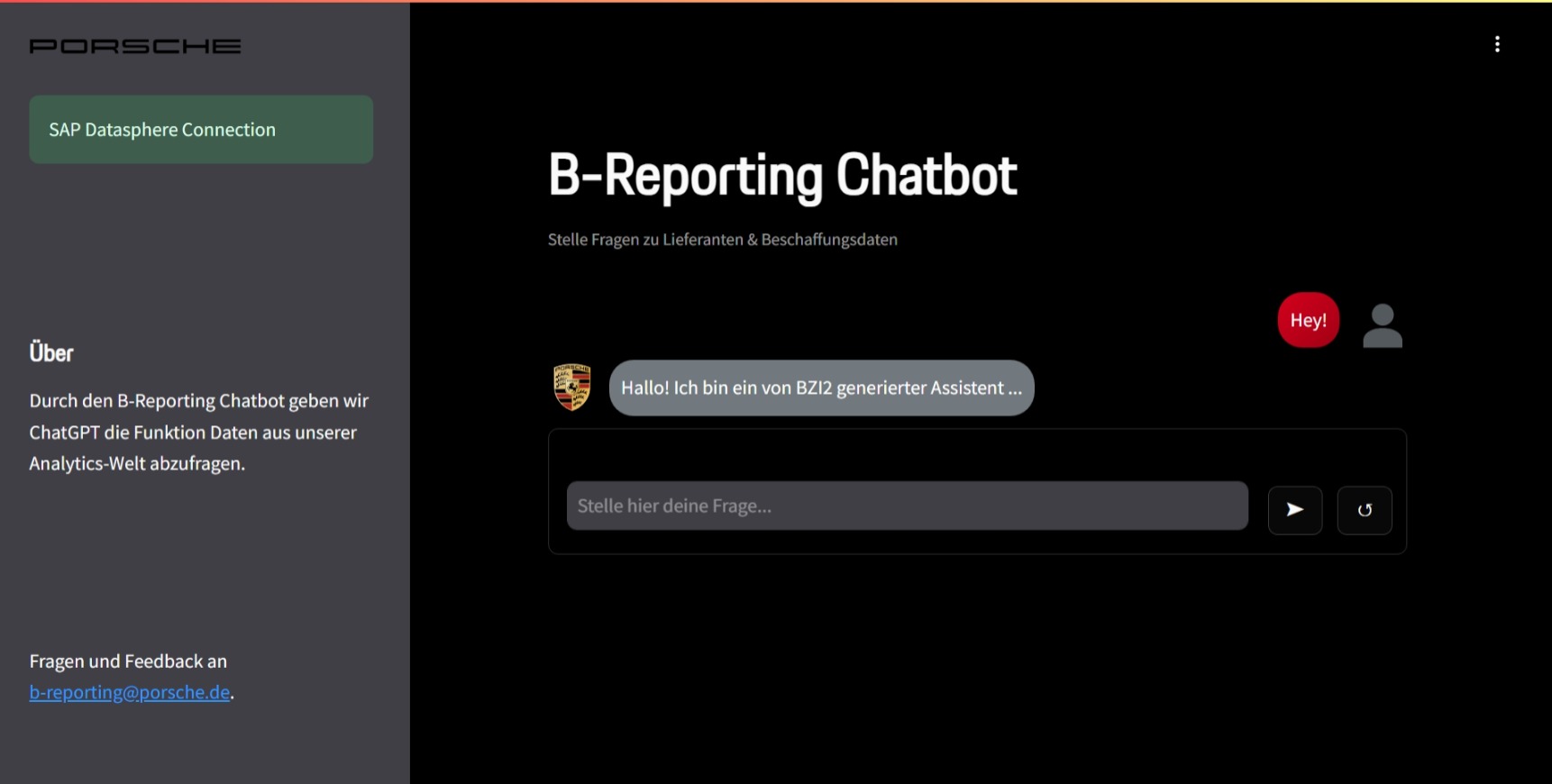
The Streamlit interface provides a clean, dark-themed chat interface where users can ask questions about suppliers and procurement data. The design emphasizes simplicity and trust, with clear data source indicators and connection status.
We deployed to the company’s internal Cloudera-based data platform, which runs on top of AWS but behaves nothing like a modern developer platform: no Git integration, no real CI/CD, manual uploads instead of pipelines. A lot of the engineering challenge was getting a clean architecture to run in a very constrained environment.
Technical Deep Dive
Parallel LLM Workflow
The system uses parallel execution to significantly improve chat completion latency:
graph TD
    A["User sends chat/completions request"] --> B["Parse request & detect SQL"]
    B --> C{"SQL detected in response?"}

    C -->|No| D["Return normal response"]
    C -->|Yes| E["Start Parallel Execution"]

    E --> F["Thread 1: Execute SQL Query"]
    E --> G["Thread 2: Generate SQL Explanation"]

    F --> H["Database returns results (2-10s)"]
    G --> I["LLM explains SQL code (1-3s)"]

    H --> J["Format results as markdown"]
    I --> K["SQL explanation ready"]

    J --> L["Combine: Results + Explanation + User Prompt"]
    K --> L

    L --> M["Return enhanced response with analysis prompt"]
    M --> N["User sees: Results + Explanation + Analyze Prompt"]

    N --> O{"User responds 'Ja'?"}
    O -->|Yes| P["Generate detailed business analysis"]
    O -->|No| Q["Continue conversation"]

    P --> R["Return comprehensive data insights"]
This parallel approach reduces total response time from ~12-13 seconds (sequential) to ~10 seconds (parallel), while the user perceives the explanation as “instant” since it’s ready when the SQL results arrive.
End-to-End Data Flow
The complete data flow from user input to visualization:
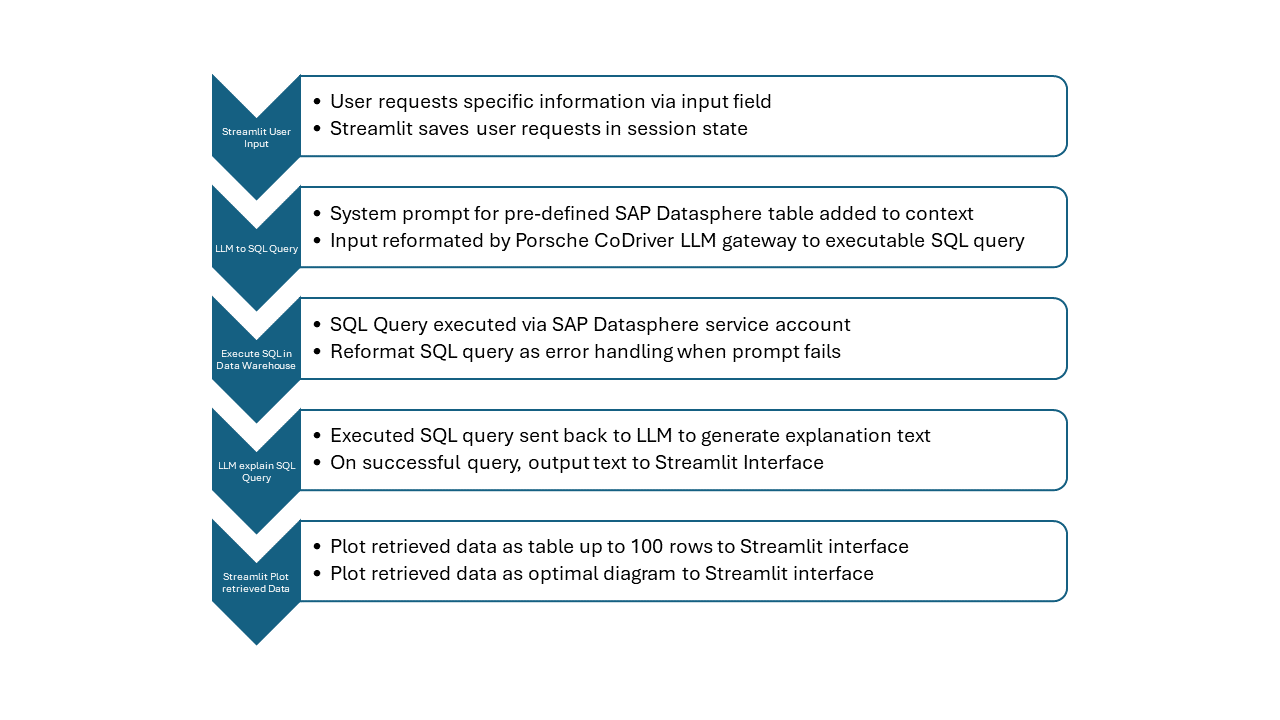
The workflow consists of five main stages:
- User Input: User requests specific information through the Streamlit interface, with requests saved in session state
- LLM to SQL Query: System prompt with SAP Datasphere table information is added to context, and the user’s input is reformatted by the LLM gateway into an executable SQL query
- Execute SQL in Data Warehouse: The generated SQL query is executed using an SAP Datasphere service account, with error handling and query reformatting mechanisms
- LLM Explain SQL Query: The executed SQL query is sent back to the LLM to generate an explanation text, which is outputted to the interface if successful
- Visualize Retrieved Data: The retrieved data is plotted as a table (up to 100 rows) and as an optimal diagram on the Streamlit interface
Automatic Table Selection
Instead of requiring users to specify which dataset to query, CoAnalyst automatically routes queries to the right specialist agent:
- Keyword-based matching: Analyzes user queries for domain-specific terms (EKV, EKL, MEK, Finanzrating, etc.)
- Confidence scoring: Provides confidence scores for selection decisions
- Fallback to orchestrator: Uses general-purpose agent for ambiguous queries
- Specialized system prompts: Each agent has a domain-specific prompt with business terminology, field explanations, and sample queries
Connection Optimization
- Direct DSP First: Prioritizes direct SAP Datasphere connections via
hana_mlfor better performance - Smart Fallback: Uses Cloudera gateway when direct DSP connection fails
- SSL Configuration: Proper SSL verification settings for both connection methods
- Enhanced Logging: Clear visibility into which connection method is being used
Model Context Protocol (MCP)
CoAnalyst exposes an MCP server that allows AI assistants (Claude, Cursor, etc.) to:
- Query SAP Datasphere and other connected data sources
- Run LLM agents with context-aware workflows
- Access tools and resources in a standardized, secure way
Every FastAPI route is automatically exposed as an MCP tool via FastApiMCP, enabling seamless integration with modern AI development environments.
Technology Stack
Backend
- FastAPI for REST API and MCP server
- Python 3.x with async/await support
hana_mlfor direct SAP Datasphere connectionsrequestsfor gateway fallback connections- Langfuse for observability and usage analytics
LLM Integration
- Azure OpenAI (GPT-4o) as primary LLM
- CoDriver LLM support with custom token authentication
- OpenAI-compatible
/v1/chat/completionsAPI format - System prompts with domain-specific business terminology
Data Access
- SAP Datasphere via curated views
- Gateway for Cloudera-based access
- Connection pooling and retry logic
- SQL query validation and execution
Deployment
- Docker containerization
- Internal data platform deployment
- Custom CI/CD scripts for Cloudera environment
- Environment-based configuration via
.envfiles
Testing & Quality
- pytest for unit testing
- SQL display limit testing
- CoDriver token validation tests
- Prometheus metrics endpoint
Design & Research
The actual “AI” was the easy part. The hard part was getting 700+ people to trust and use it.
1. Field research with buyers

I spent the first weeks shadowing buyers and doing informal interviews:
- Which reports do you request most often?
- Where do you currently get stuck?
- Which decisions would you like to take faster?
Patterns we found:
- long delays waiting for reporting teams
- SAP transaction codes that only a few power users really understood
- fear of “breaking something” when touching raw data
This informed our MVP scope (supplier 360, price history, risk overview) and the prompts we optimised first.
2. Feedback wall: 56 items → themes → roadmap
During the pilot we ran weekly feedback sessions with several departments. Every comment landed in a shared collaboration tool: requests for joins, better column names, euro-format numbers, trust indicators, integration with other tools, and more.
We clustered them into themes:
- Trust & UX “Where do the numbers come from?”, “Can I export more than 500 rows?”, “Please use formal address.”
- Data coverage Integration with other tools, external market and energy data, cross-divisional tools
- Intelligence better follow-up handling, reasoning over trends, proactive suggestions
Each cluster turned into roadmap items: system prompt editor, dataset sidebar, explanation text, example prompts, automated tests, usage analytics.
3. Designing for trust
We learned that many users either over-trust or under-trust AI:
- Some would copy results straight into presentations without checking
- Others were afraid to use it at all
Design responses:
- Clear “Datenherkunft” panel showing which datamart, which filters and which columns were used
- Microcopy reminding users that CoAnalyst supports, but does not replace, their responsibility
- Example queries for each dataset to show “what this thing is good at”
- Short training videos and key-user “multipliers” in each department driving responsible use
Integrations & Ecosystem
CoAnalyst was never intended as a standalone app. It’s the “brain” that other tools can call.
Integration with Existing Tools
Despite these setbacks, interest in the project remained high. More and more people wanted access. Together with my colleague Jan Klenk, I held weekly feedback sessions, collected suggestions for improvement, adapted the user interface, and documented every single change. Finally, CoAnalyst officially went into pilot operation, initially with around 100 users.
But one key problem remained unresolved: user retention. Usage remained below expectations, although the CoAnalyst prototype was functional. Apparently, access to the application was complicated, and the user interface seemed technical and untrustworthy. The platform generated links that no one wanted to remember. On top of that, there were unpredictable error messages. Some users even reported that they had closed the app because they found the UI confusing. It became clear that the application had to be where users were already working.
Together with the “NewTech” team, I came across Matterway, a Berlin-based startup that had developed a widget system for existing web applications. The software could be embedded directly via the DOM of the target page and allowed the development of context-specific assistants. The decisive advantage was that Matterway was already installed on all end devices across the company. This meant that CoAnalyst could be displayed directly via an icon on the existing SAP pages. No new links, no new tools, no training.
I deliberately designed the CoAnalyst API to match the structure of the OpenAI Chat Completion API. Input and output were in a JSON format that was interoperable with GPT-compatible interfaces. This made integration easy. Within a day, I later developed a plugin for the company’s internal LLM interface. Thanks to the OpenAI-identical structure, I was able to integrate the existing API with virtually no changes. Only minimal adjustments to the frontend were necessary, with no extra backend on the plugin side.
The team responded enthusiastically. Many of them only now understood what I had been preparing in the months before. The API architecture and the clean separation of data access and presentation paid off. The application did not look like an experimental tool.
Tool Integrations
- In cost analysis tools, buyers can click a row and ask CoAnalyst questions about cost drivers, driven by underlying data and macroeconomic information.
- In risk management tools, CoAnalyst links risk positions to underlying records and suggests next steps.
Enterprise Copilot Integration
We sketched an enterprise copilot plugin where CoAnalyst runs as a secure, platform-backed “chat with your procurement data” inside the company’s internal Copilot. This required:
- thinking about multi-stage deployments and budget for a long-running platform
- mapping our API to the copilot’s plugin model
- implementing custom token authentication
- ensuring OpenAI-compatible API format for seamless integration
The API supports multiple LLM backends (Azure OpenAI GPT-4o and custom enterprise LLMs), with unified behavior across all providers.
Model Context Protocol (MCP) Integration
CoAnalyst exposes a full MCP server, making it accessible to modern AI development tools:
- FastApiMCP integration: Every FastAPI route automatically becomes an MCP tool
- Standardized access: AI assistants (Claude, Cursor, Replit, Zed) can query enterprise data through MCP
- Secure tool execution: SQL execution, validation, and connectivity checks via MCP protocol
- Context-aware workflows: Multi-turn conversations with proper context management
This architecture enables CoAnalyst to be used not just as a standalone application, but as a data layer for any MCP-compatible AI tool.
We also prepared an internal talk showing how the same CoAnalyst architecture could power other data products and reporting chatbots.
Scaling & Impact
After the first demos, demand exploded.
- We started with a small pilot (~50 buyers).
- Within months, CoAnalyst was rolled out to 700+ users across procurement.
- Weekly active usage stabilised around ~40% in busy weeks, with heavy use during negotiation prep.
Users reported:
- ~2+ hours saved per week on data retrieval and report creation
- ability to run analyses themselves instead of queuing requests to reporting teams
- better prepared negotiations when combining historical performance data, risk ratings and external indicators
One moment in particular stuck with me. In a team meeting, a colleague told me that CoAnalyst had enabled her to read data independently for the first time without having to wait for the reporting team. That demonstrated the fact that we were making data accessible to people who now do not require proprietary knowledge anymore.
“Zum ersten Mal kann ich meine Daten selber lesen, ohne auf das Reporting warten zu müssen.”
(For the first time, I can read my data myself without having to wait for reporting.)
Demand spread beyond procurement: logistics, development, quality, supplier management and other divisions reached out to test their own use cases.
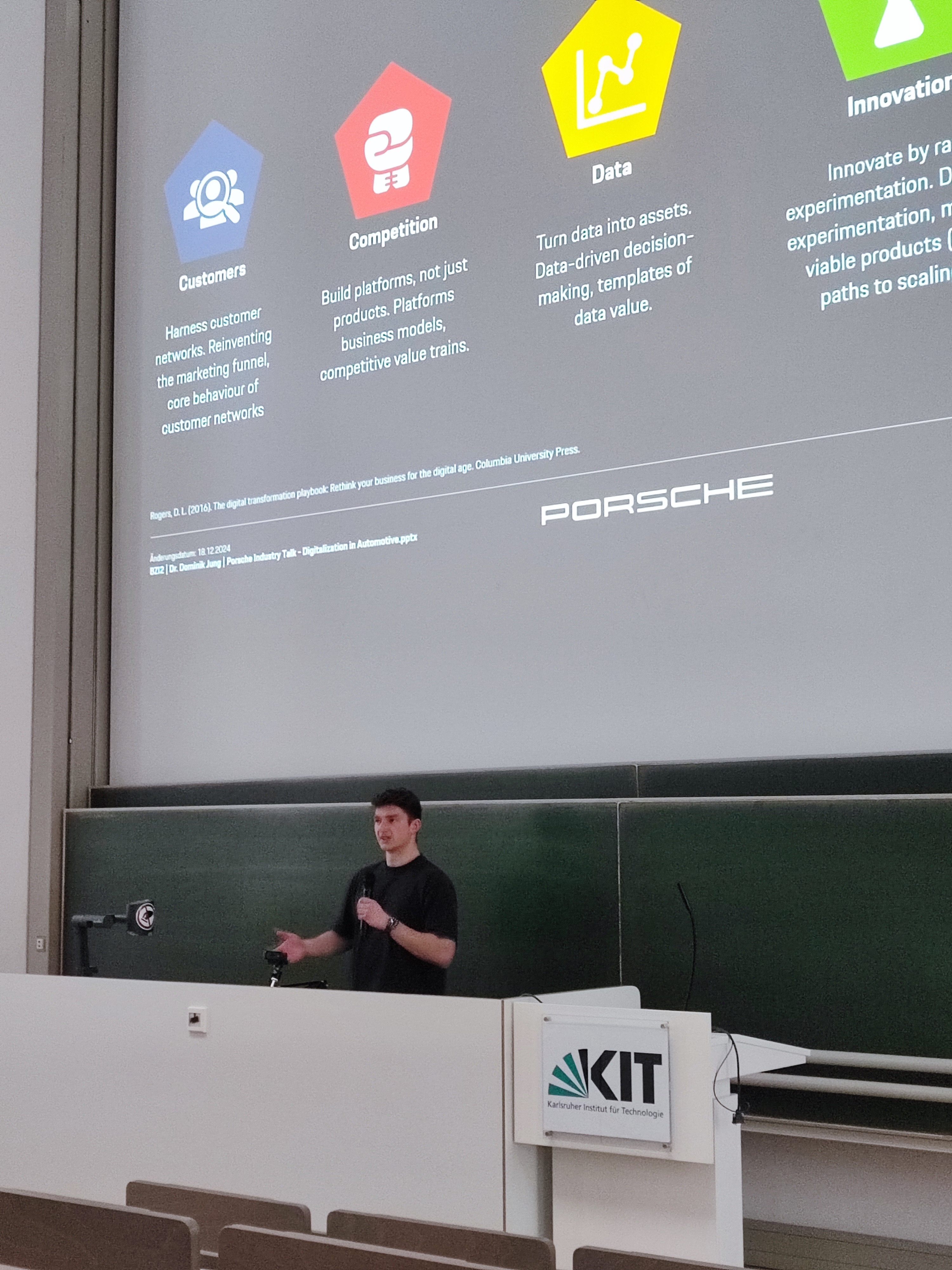
Shortly afterwards, I was invited to present at the annual Digital Family Day, an internal pitch conference with over 700 employees connected. In a live demo, I showed the new features, talked about the API integration and answered questions from various departments. The feedback was overwhelmingly positive. I was particularly proud of a colleague from purchasing who said: “I never thought something like this could come from our own department.”
A few weeks later, I was sitting in a one-on-one session with a member of the procurement executive board. I presented CoAnalyst, explained the architecture, showed concrete user statistics and roadmap ideas. The board listened with interest. At the end, he said, almost casually: “We should make this a mobile app too. The entire executive board works exclusively on iPads.”

Crazy thought: what does the board actually do all day? The real users weren’t sitting in the boardroom, but in purchasing, logistics, and supplier relations. People who worked with data every day, not with presentations on iPads.
What I took away: Visibility within a corporation is not only created by technology, but also by connectivity. A good product doesn’t just have to work. It has to be accessible and familiar. CoAnalyst was well on its way to achieving this and I had learned that clean interfaces, and a clear product line are more effective than any PowerPoint presentation.
Internally we estimated that, if fully adopted, CoAnalyst could unlock low single-digit millions in annual savings through faster identification of price deltas, risks and consolidation opportunities.
Working Within Constraints
This project was also a crash course in what it means to ship AI in a big, non-software-native enterprise.
Some of the constraints:
-
No real DevOps. The internal data platform had no Git integration or CI/CD. Every deployment was a manual upload into a Cloudera-based environment. We built custom deployment scripts to automate what we could, but the platform itself remained a bottleneck.
Despite these constraints, we implemented a CI/CD pipeline using GitLab CI/CD that automated building, testing, and deployment:
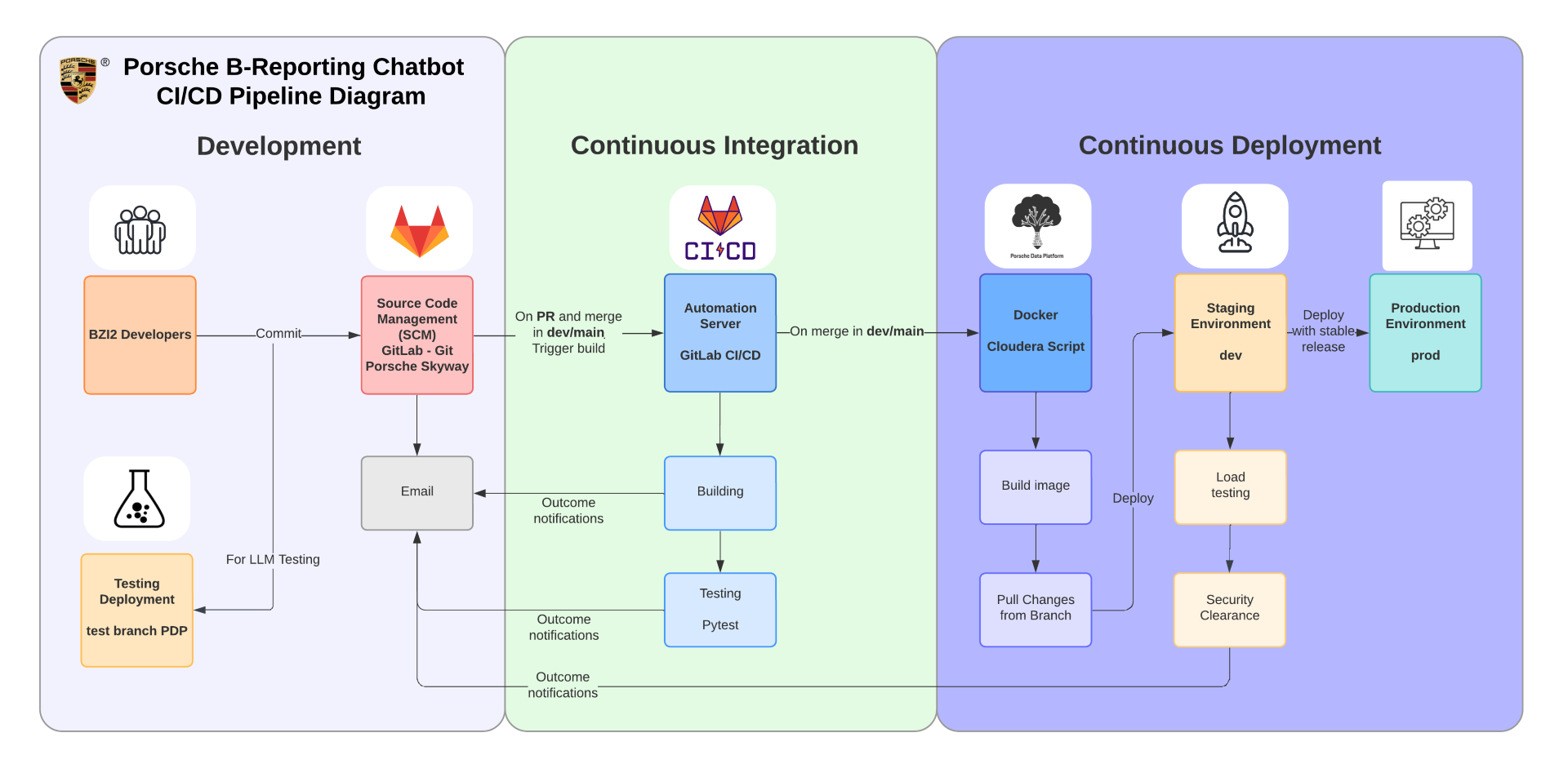
The pipeline includes:
- Development: Developers commit code to GitLab, with separate testing deployment for LLM testing
- Continuous Integration: Automated building and testing (Pytest) triggered on PR and merge to dev/main, with email notifications for outcomes
- Continuous Deployment: Docker image building with Cloudera scripts, deployment to staging (dev) environment, load testing, security clearance, and finally production deployment with stable releases
This automation layer enabled parallel development and staging of changes, even within the constrained platform environment.
-
Platform outages. One particularly frustrating experience: our entire user base suddenly lost access to the platform. The cause was an incorrect change in the central group management. It took two days to discover that our entire workspace configuration had been accidentally deleted by the platform owners themselves. I had to set up the system again, reinstall all packages, and reassign all roles from scratch.
Later, the company decided to move from a data center in Frankfurt to one in Ireland for cost reasons. The entire platform operation was frozen for almost a week. That meant no access to the application, no access to the code, no access to the logs. Several users from the purchasing department contacted me. One wrote: “I was just about to show it at the jourfix, but nothing works anymore.”
-
Device & access policies. I spent months on a locked-down Windows machine without admin rights, juggling workarounds until I finally received a Mac for my capstone work.
-
Connection complexity. SAP Datasphere connectivity required multiple layers: direct
hana_mlconnections when possible, Cloudera gateway fallback, SSL configuration, and token management. We built robust retry logic and connection pooling to handle these constraints gracefully.
These experiences deeply shaped how I think about infrastructure as a design constraint: clean interfaces, API-first thinking, and a clear product line turned out to be more persuasive inside the organisation than any slide deck.
Technical Resilience
To work within these constraints, we built:
- Connection optimization: Direct DSP connection with automatic fallback to gateway
- Error handling: Comprehensive error messages and retry logic for platform instability
- Observability: Langfuse integration for usage analytics and debugging
- Modular architecture: Clean separation between API, agents, and data access layers
- Testing infrastructure: Unit tests for critical paths (chat endpoints, SQL display limits)
Reflection
CoAnalyst taught me a few things I’ll carry into future work:
-
AI is not the product. The value came from making decades of SAP infrastructure usable through a conversational, generative interface not from yet another model.
-
Trust beats magic. Procurement doesn’t need “wow” answers; it needs traceable ones. Source panels, example prompts and responsible-use training mattered more than clever prompts.
-
Ownership vs. bureaucracy. I appreciated the trust and responsibility from my team lead. We prepared approvals, shifted positions, planned cost structures. Then came the news: the HR department blocked the process. Technically, the hire was not feasible. The entire process was stopped. All the work my team had put in was worthless, and I was disappointed. Not because of the decision itself, but because of the way it was communicated. They just said, “It’s not possible.” This made it clear that I ultimately want environments where ownership and speed are the norm, not the exception.
With the transition from internship to working student, my focus drastically changed. I was forced to set clear priorities due to the legal limit of twenty hours per week. I stopped participating in tasks outside my responsibility and concentrated exclusively on CoAnalyst. I also completely eliminated the four hours of video calls that used to block my calendar every day. At first, I stuck strictly to my working hours and worked exactly twenty hours. No commits on evenings and weekends. The result: progress slowed down. After a few weeks, I reflected on this and decided to use my time more flexibly, no matter what the company paid me.
-
Parallel execution matters. The parallel SQL execution + explanation workflow wasn’t just an optimization, it fundamentally changed user perception of speed. Users don’t notice 10 seconds when they see results and explanation together, but they notice 12 seconds when they wait sequentially.
-
API-first design pays off. Building an OpenAI-compatible API and MCP server from day one meant we could integrate with various tools and future platforms without rewriting core logic. The frontend became a detail, not a constraint.
-
System prompts are product design. The difference between a technical SQL prompt and a business-friendly German prompt with field explanations wasn’t just better UX, it was the difference between adoption and abandonment. Every word in a system prompt is a product decision.
CoAnalyst was my first large-scale, agentic enterprise AI product and the project that convinced me to keep building systems where AI, infrastructure and human workflows are treated as one design space, not separate silos.
Looking Forward
With the completion of my capstone project, CoAnalyst officially became a relevant application. Demand from other departments is noticeably increasing. Teams from logistics, development, quality assurance, and supplier management are constantly contacting me. Everyone sees potential and is asking questions, wanting to test their own use cases.
In the last few weeks of my project, my calendar changed. Instead of programming, my agenda was filled with demos, training sessions, and integration meetings. Not a day goes by without calls. CoAnalyst is ready for production, but not yet perfect. Also, the real political work is now beginning for my department.
I don’t think the company is my future. The failed attempt at a permanent position has left its mark. Even if they now want to bring me back in, either as a freelancer or through subsidiaries, my gut feeling tells me to try something new.
It’s the predictable pace, and the calendars that freeze at noon because lunch break is sacred. The idea that meetings are more important than results. And I realize that I want to break away from it before I get used to it.
What I need is ownership. I want to take responsibility, not just fulfill tasks. I want to make a direct impact, not just prepare for it. I want to understand why a product is needed and feel how it is used. And I want to work with people who challenge me.
Maybe that means starting a company that focuses on products rather than processes. I know that I will learn even more there and that I can contribute more.
CoAnalyst was the starting point. Now it’s about what I make of it.
